If you're used to SharePoint, and the display form on lists, you may be thinking you can use that on your SharePoint Online Public Sites as well. Sadly, by default your anonymous users cannot access the display form of a list item. Instead, SharePoint Online prompts the user to login. Annoying? Yes. It is due to... Continue Reading →
Vertical Promoted Links in SharePoint 2013
I had the pleasure of helping out Veronique via SPYam. It’s a great use case for the promoted links list!
SharePoint 2013 has nice little tiles called Promoted Links to link to stuff all over your sites. However, they all display horizontally when you add them to your page. Silly Microsoft for not providing us the option to list them horizontally or vertically in the first place – but thank you SharePoint community for providing the work-around, (and specifically in this case, David Lozzi)! :) I love copy / paste code!! Learn how to do this from our discussion on Yammer – thanks for your help David!
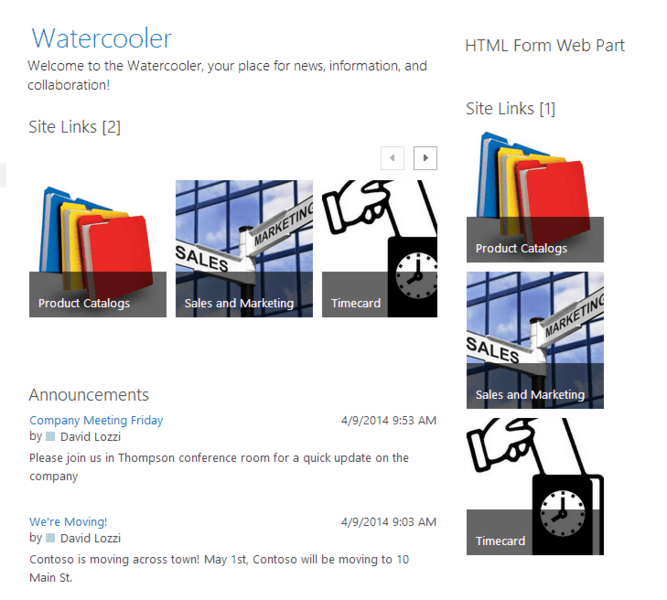
================================================================
Post Blog Update : So it seems not everyone is on Yammer. Instructions and code copied and pasted below for your convenience. :)
<style type=”text/css”>
.ms-promlink-body {width: 170px }
.ms-promlink-header {display: none}
</style>
Drop it into the Edit Source bit of the Content Editor Web Part on the page to make it work. If the web part is too wide, insert it into…
View original post 104 more words
Bringing SharePoint Public: Using SharePoint Online for your web site
I am very pleased to share that I will be presenting at this month's Boston Office 365 user group, on August 21st. I will be sharing about using SharePoint Online public website, which you get with your Office 365 tenant, to host your web site. We'll cover some techie stuff but I will mostly cover... Continue Reading →
Presentation: Collaboration Throwdown: Salesforce vs SharePoint
My colleague Marty and I had the wonderful opportunity to present at the Boston SharePoint Users Group, comparing the collaboration features between Salesforce and SharePoint Online (Office 365). We did our best as we went round for round, comparing key features focusing on collaboration: social, documents, lists and data, workflows and mobility. Download the deck... Continue Reading →
Throw down: Salesforce Communities vs SharePoint Online
Salesforce Communities or SharePoint Online, what's right for you? They both boast collaboration, but which one works for you? My colleague, Marty Chang (Salesforce Architect, @martyychang, blog) and I will be battling head to head at the upcoming Boston SharePoint Users Group, July 9th, comparing the collaboration, user experience and mobility features of each platform. Register here!... Continue Reading →
Before you make SharePoint Public – 2 more times
I wanted to quickly share on two more options for you to listen in on my session Before you make SharePoint Public. SP24 is reairing all of their sessions, this Wednesday and Thursday, May 14th - 15th. My session will be run Wednesday night, at 9pm EST. I hope you can make it. Check out the wrap up... Continue Reading →
Coming to Boston: Office 365 User Group!
Are you curious about Office 365? What it is, how it can save you time and help you be more productive? Are you getting the full benefits of all that Office 365 has to offer? One of the ways for people to get the most out of this new and constantly evolving suite of products... Continue Reading →
Navigating multiple calendars in SharePoint
This topic came up over on SharePoint.StackExchange.com, and I thought I'd share here too. You may want to setup a single page to view multiple calendars. Calendar overlay is a great way to handle this, but what if you want to see these side by side, and let the user navigate the dates in unison,... Continue Reading →
New to Office 365 SharePoint – Open This Link On A Phone
I found a new update on Office 365 today! This comes as a surprise since it wasn't mentioned anywhere else yet, even in the message center (see my other post on 2 other recent Office 365 updates, one of which I have not seen yet). I've confirmed this update is available in another tenant, not just... Continue Reading →
Before You Make SharePoint Public
Today I presented at the first 24-Hour SharePoint Conference! Thank you all for attending. My session was prerecorded, which was a little odd to record a session without an audience, but it was worth it. I had a lot of fun doing it and I had a great turn out. Thanks again for joining! You can watch it... Continue Reading →

